Computer vision is a field of artificial intelligence that enables software systems to interpret and act on information from images, video, and camera feeds. In simple terms, it helps machines "see" so they can detect objects, read text, inspect products, track movement, or trigger business actions based on what appears in a visual scene.
You may also hear closely related terms such as machine vision, AI camera, smart camera, image recognition, or video analytics. In many business conversations, these phrases overlap, even though they can carry slightly different meanings depending on the industry and use case.
For business owners, the value is straightforward. Computer vision turns visual information that people normally inspect by hand into data a system can process at scale. That can mean checking product quality on a production line, reading delivery documents, monitoring safety zones, counting inventory, or identifying issues faster than a manual process can.
This guide explains what computer vision is, how computer vision works, common computer vision examples, where machine vision and AI camera systems fit in, and how computer vision applications create real business value.
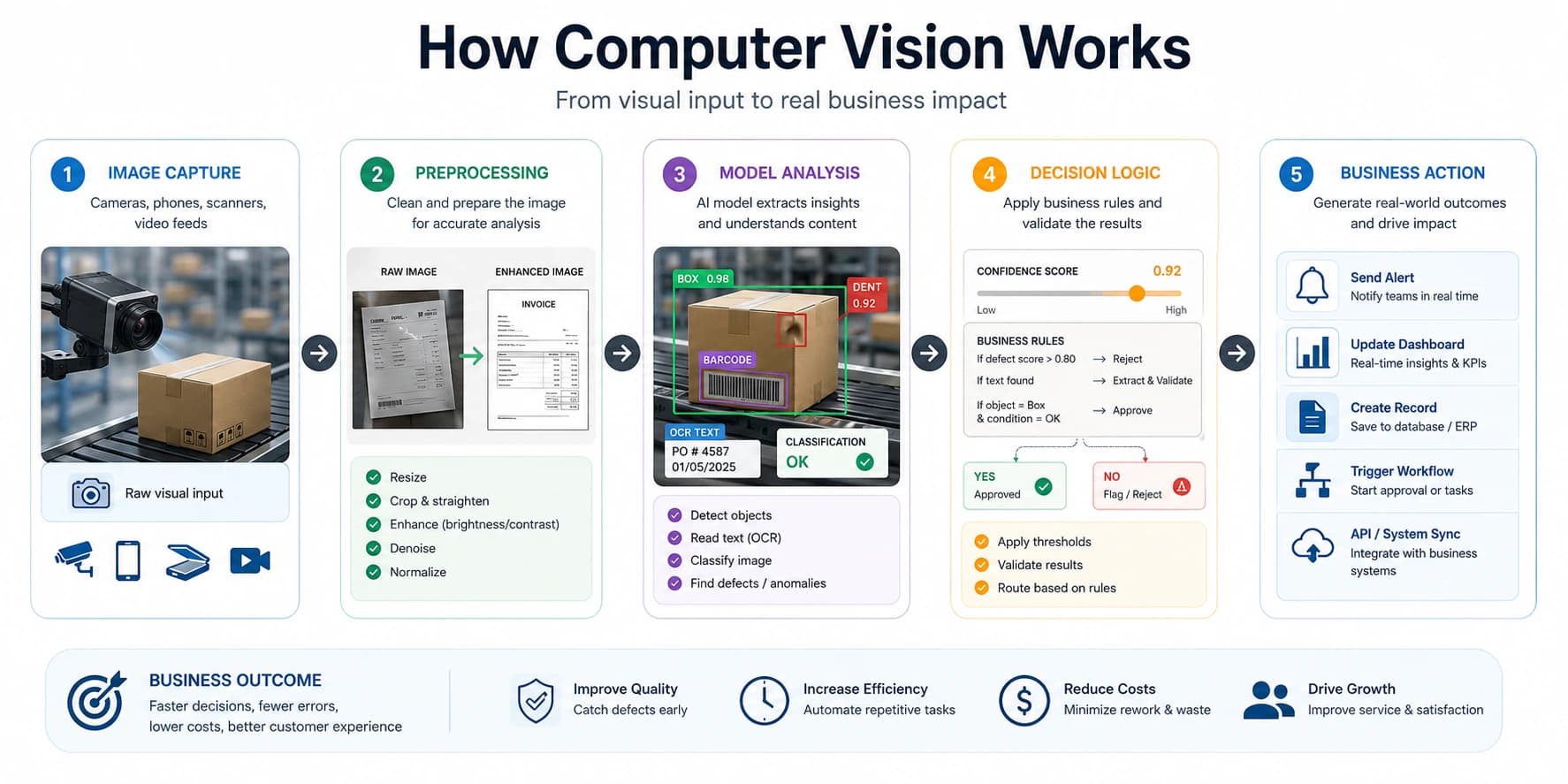
Figure 1. A simple view of the computer vision pipeline, from raw visual input to business action.
What is computer vision?
Computer vision is the branch of AI focused on understanding visual data. A computer vision system takes an image or video as input and produces a useful output such as a label, measurement, detection, decision, or alert.
Depending on the use case, that output might answer questions like:
- Is there a defect on this product?
- What text appears on this invoice, label, or ID document?
- How many items are on this shelf?
- Is a person wearing required safety equipment?
- Has a vehicle entered a restricted area?
The goal is not simply to display images on a screen. The goal is to extract meaning from visual information in a way that supports a workflow, business process, or operational decision.
That is why computer vision matters in business. Most operations already depend on visual checks, whether that happens in warehouses, factories, retail stores, farms, logistics yards, healthcare settings, or mobile apps. Computer vision makes those checks faster, more consistent, and easier to scale.
In some industries, especially manufacturing, the phrase machine vision system is more common than computer vision system. In other settings, people may search for an AI camera system, smart surveillance camera, visual inspection system, or image recognition software. These are often different entry points into the same broader category of vision-based automation.
How computer vision works
At a high level, computer vision works by converting images into structured information that a software system can understand. The exact models vary, but the flow is usually similar.
1. Image capture
The process starts with a visual input. This can come from:
- fixed industrial cameras
- CCTV systems
- mobile phone photos
- drones
- vehicle cameras
- medical imaging devices
- uploaded documents or scans
The quality of the input matters. Lighting, camera angle, resolution, motion blur, background clutter, and object size all affect results. Many computer vision problems are not solved by the model alone. They are solved by the combination of camera setup, data pipeline, and model design.
2. Preprocessing
Before analysis, the image is often cleaned or standardized. Preprocessing can include resizing, cropping, denoising, contrast adjustment, color normalization, or perspective correction.
This step helps the model focus on the most relevant information. For example, if a business wants to read text from delivery paperwork, the system may first detect the document boundary, straighten the image, and improve contrast so the OCR stage performs better.
3. Feature extraction and model inference
This is where the AI model analyzes the image. Modern computer vision systems often use deep learning models, especially convolutional neural networks and transformer-based vision models, to learn patterns from training data.
The model may be built for one or more tasks:
- classification: deciding what is in an image
- object detection: locating specific objects in an image
- segmentation: identifying exact regions or boundaries
- OCR: reading printed or handwritten text
- pose estimation: tracking body or object positions
- anomaly detection: finding unusual patterns or defects
During inference, the trained model compares the new image against patterns it learned before and produces predictions with confidence scores.
4. Post-processing and decision logic
Raw model output is usually not enough on its own. Businesses need usable results. That means applying rules, thresholds, validation, and workflow logic after the model returns a prediction.
For example:
- a quality inspection system may reject a product only if the defect score exceeds a threshold
- a document system may cross-check extracted text against expected formats
- a safety system may trigger an alert only if a restricted-zone breach lasts more than a few seconds
This is where computer vision becomes part of a larger software system rather than just a demo.
5. Business action
The final stage is action. A good computer vision application should lead to something useful:
- create an inspection record
- trigger a notification
- stop a machine
- route a task to a team
- update a dashboard
- log an event for compliance
- feed data into another business system
That last step is often the difference between an interesting model and a valuable solution.
Computer vision vs machine vision
Computer vision and machine vision are closely related, but they are not always used in exactly the same way.
Computer vision is the broader term. It covers any AI-based system that interprets images or video to produce useful outputs such as detections, classifications, measurements, OCR results, or alerts.
Machine vision is often used more specifically in industrial settings. It usually refers to camera-based inspection or guidance systems used in factories, packaging lines, robotics, and automated quality control. A machine vision system might check whether a label is correct, confirm that a component is present, or identify a defect on a production line.
A simple way to frame it is:
- computer vision is the broad AI field for understanding visual data
- machine vision is often the industrial application of that capability
In practice, many businesses use the terms interchangeably, especially when talking about automated inspection cameras, quality control cameras, or visual inspection systems.
Computer vision vs image processing
Many people use these terms interchangeably, but computer vision and image processing are not the same thing.
Image processing focuses on changing or improving an image. It often involves operations such as sharpening, resizing, filtering, denoising, or adjusting contrast. The main purpose is to transform the image itself.
Computer vision focuses on understanding the image and producing an interpretation or decision. The purpose is to answer a question about what the image contains.
In practice, image processing is often part of a computer vision pipeline. A system may preprocess an image first and then apply a computer vision model afterward.
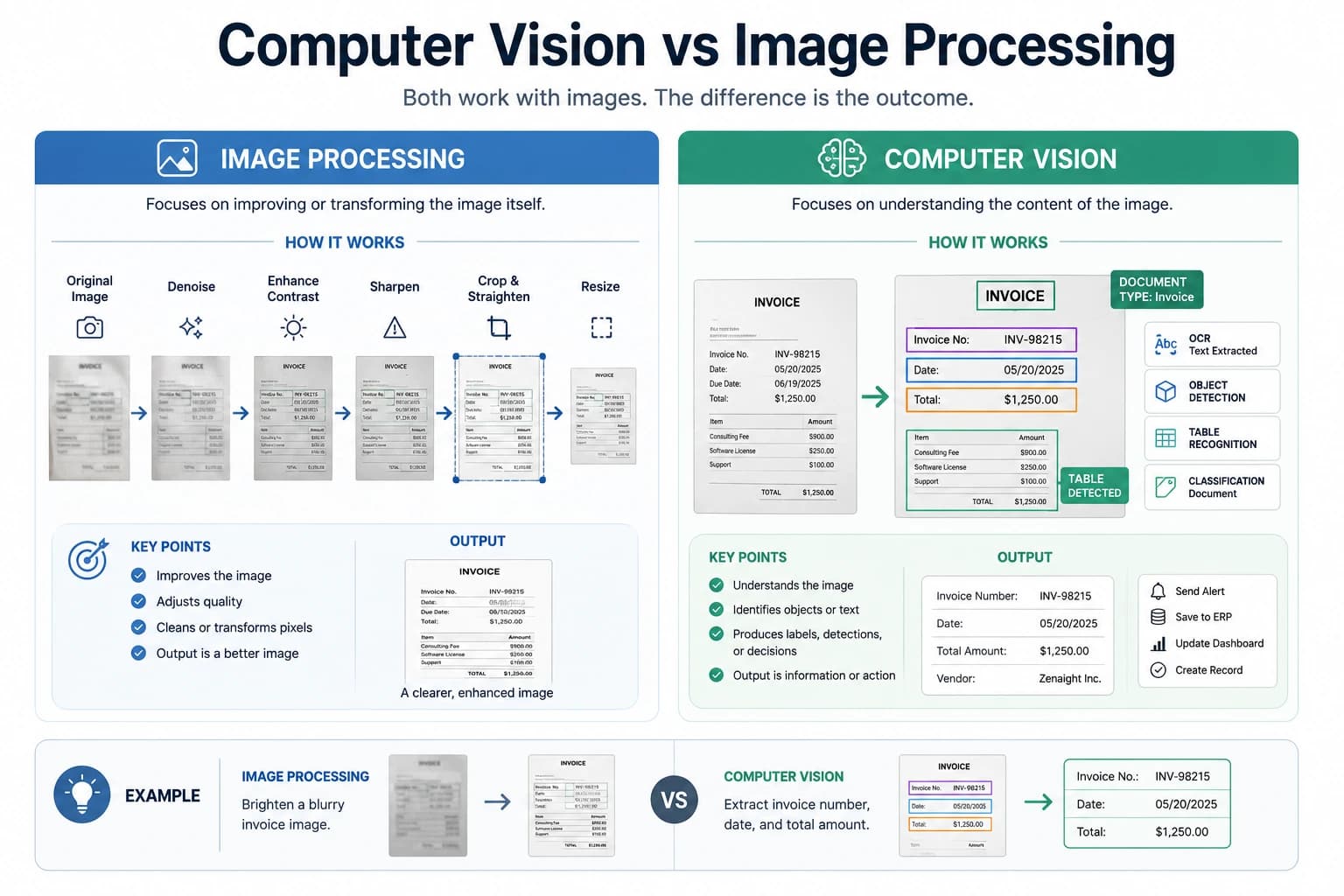
Figure 2. Image processing improves the image itself, while computer vision interprets the image and produces useful outputs such as detections, extracted text, or decisions.
Here is a simple way to think about it:
- image processing improves the picture
- computer vision understands the picture
Computer vision examples
Computer vision examples appear across more industries than many business owners expect. Some are highly visible, while others operate quietly in the background. Depending on the context, the same solution may also be described as image recognition, video analytics, machine vision, or an AI camera application.
Manufacturing
In manufacturing, computer vision is widely used for quality inspection. Cameras can check for missing components, surface defects, alignment errors, incorrect labels, or packaging issues faster than manual review. This improves consistency and reduces waste. In this environment, businesses often refer to these tools as machine vision systems, automated optical inspection, visual inspection systems, or AI inspection cameras.
Logistics and warehousing
In logistics, computer vision can read labels, detect damaged parcels, monitor loading areas, count pallets, track vehicle entry, and support yard or warehouse visibility. It is especially useful where speed and traceability matter. Searchers may also describe these tools as smart camera systems, warehouse vision systems, or video analytics platforms.
Retail
Retail teams use computer vision for shelf monitoring, stock counting, queue analysis, loss prevention, and store analytics. Instead of relying only on manual audits, the business can get a near real-time view of product placement and store activity. In retail, terms like image recognition, shelf analytics, store video analytics, and AI camera monitoring are also common.
Agriculture
In agriculture, computer vision can help identify crop disease, monitor livestock activity, analyze plant health, and track movement across large areas. Combined with drones or edge devices, it supports better field visibility and earlier intervention.
Healthcare
In healthcare, computer vision applications include medical image analysis, document capture, workflow automation, and assistive review systems. In many cases, the technology supports professionals rather than replacing them.
Security and safety
Computer vision is used to monitor restricted areas, detect PPE compliance, count people, identify unusual events, and improve response times. These systems are most useful when connected to alerts, logs, and operational procedures. This category is often searched under AI CCTV, smart security camera, intelligent video analytics, or AI-powered surveillance.
Finance, insurance, and admin workflows
Document-heavy workflows also benefit. OCR and vision models can extract data from IDs, invoices, claims, receipts, forms, and proof-of-delivery documents. This reduces repetitive manual capture work and speeds up downstream processes. In some markets, this is described as intelligent document processing, AI document capture, or image-to-data extraction.
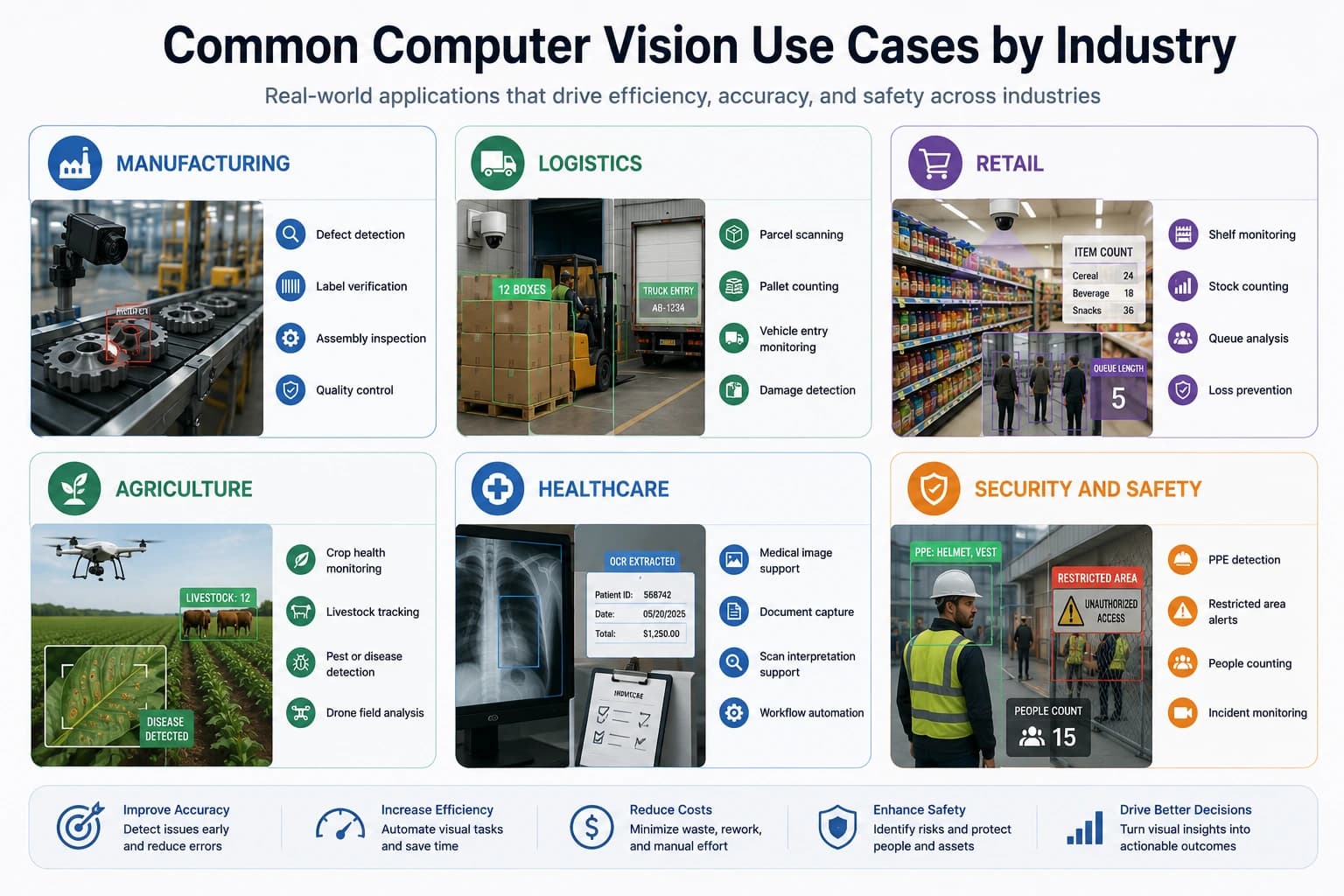
Figure 3. Common computer vision applications across manufacturing, logistics, retail, agriculture, healthcare, and safety environments.
Computer vision applications in business
When business owners ask about computer vision in business, the most useful question is not "What can the model detect?" It is "What operational problem can this solve?"
Strong computer vision applications usually fall into a few practical categories.
Inspection and quality control
This is one of the most mature areas. If your team checks products, labels, components, surfaces, or packaging visually, a computer vision system may help automate part of that work.
OCR and document extraction
Businesses that process forms, IDs, invoices, receipts, or delivery documents often use vision systems to read and structure text from images. This is especially valuable when images come from mobile phones rather than perfect flatbed scans.
Monitoring and alerts
Computer vision can watch environments continuously and raise alerts when something important happens. That can include safety events, unusual motion, equipment changes, queue buildup, or entry into restricted areas. This is where AI camera systems, smart cameras, and video analytics software are especially common.
Counting, tracking, and measurement
Vision systems can count items, estimate occupancy, measure distances, monitor flow, and track object movement over time. This creates a useful operational layer for logistics, retail, and industrial environments. Depending on the vendor or industry, this may also be positioned as object tracking, people counting, occupancy analytics, or image recognition software.
Decision support
Some computer vision systems do not automate the final decision. Instead, they help people make faster and more consistent decisions by surfacing risk, ranking issues, or highlighting exceptions.
Related terms you may see in the market
Because search language varies, it helps to understand how related terms are commonly used:
computer vision: the broad field of AI that interprets images and videomachine vision: often used for industrial inspection, robotics, and factory automationAI camera: a camera system with built-in or connected AI analysissmart camera: a camera device that can process events or detections instead of only recording videoimage recognition: often used when identifying objects, products, people, or visual categoriesvideo analytics: usually refers to analyzing live or recorded video for events, movement, counting, or alertsvisual inspection system: a camera-based inspection setup for quality controlautomated optical inspection: a common manufacturing term for automated defect and assembly checkingOCR: optical character recognition, used to read printed or handwritten text from images
These terms are related, but they are not always perfect substitutes. The right wording usually depends on whether the business problem is inspection, document extraction, monitoring, analytics, or industrial automation.
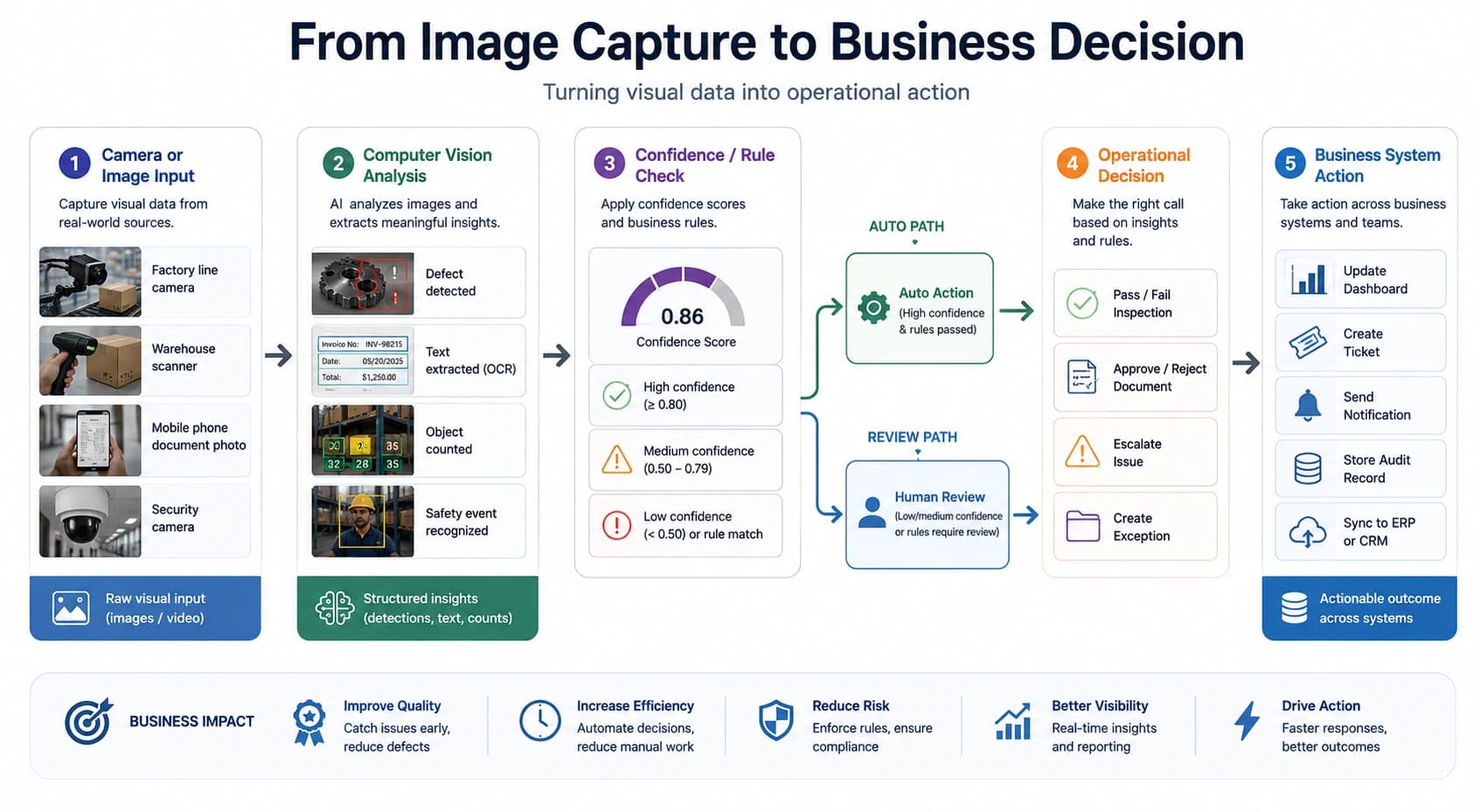
Graph 1. A practical workflow showing how image input moves through analysis, rules, human review or automation, and finally into business systems and operational actions.
Benefits of computer vision in business
For business owners, the main benefits are usually operational rather than theoretical.
- faster processing of visual tasks
- more consistent inspection and review
- reduced manual effort on repetitive work
- better traceability and data capture
- earlier detection of defects, risks, or anomalies
- improved scalability without linear headcount growth
That said, the real return depends on how well the solution fits the workflow. A technically accurate model can still fail commercially if it is too slow, difficult to use, or disconnected from the systems around it.
Challenges and limitations
Computer vision is powerful, but it is not magic. Business leaders should understand the common constraints before starting a project.
Data quality
Poor lighting, inconsistent camera positions, low-resolution images, and incomplete training data can reduce performance quickly.
Environment variability
Real-world conditions change. A system that works well in a controlled test may struggle when backgrounds, products, packaging, weather, or user behavior shift.
Integration work
The model is only one piece. Many successful deployments require camera setup, data pipelines, storage, APIs, dashboards, human review flows, and alert handling.
Accuracy requirements
Some tasks can tolerate occasional mistakes. Others cannot. A business should define what level of precision, recall, latency, and false positives is acceptable before building.
Ongoing maintenance
Computer vision systems often need monitoring, retraining, calibration, and updates as conditions change. It is better to treat them as living systems than once-off software installs.
How to choose a computer vision company
If you are evaluating a computer vision company, focus on delivery ability rather than impressive demos alone.
A good partner should be able to explain:
- what business problem the system solves
- what data and camera setup are required
- how success will be measured
- how the outputs connect to your workflow
- what happens when the model is uncertain or wrong
- how the solution will be deployed, monitored, and improved
It also helps if the company understands the difference between a prototype and an operational system. In business environments, reliability, integration, usability, and maintainability matter just as much as model performance.
Frequently asked questions about computer vision
Is computer vision part of AI?
Yes. Computer vision is a field within artificial intelligence focused on interpreting images and video.
How does computer vision work in simple terms?
It captures visual input, prepares the image, applies an AI model to analyze it, and then turns the result into a useful output such as a detection, label, measurement, or alert.
What is the difference between computer vision and image processing?
Image processing changes or improves an image. Computer vision tries to understand what is in the image and use that understanding to support a task or decision.
What are common computer vision applications?
Common applications include quality inspection, OCR, surveillance, safety monitoring, medical imaging, inventory analysis, retail analytics, and automated document capture.
What is machine vision?
Machine vision usually refers to camera-based inspection and automation systems used in industrial settings. It is often treated as a more specific, factory-focused branch or application area within the broader world of computer vision.
What is an AI camera?
An AI camera is a camera system that can do more than record footage. It can analyze what it sees and help detect objects, count people, read text, identify events, or trigger alerts. Some AI cameras process data on the device itself, while others send images or video to a connected computer vision platform.
Is image recognition the same as computer vision?
Not exactly. Image recognition is usually one task within computer vision. It often refers to identifying what is in an image, while computer vision as a whole includes many tasks such as detection, OCR, segmentation, tracking, measurement, and video analytics.
Is computer vision useful for small or mid-sized businesses?
Yes, especially when the business has repetitive visual tasks, costly manual inspections, document-heavy workflows, or environments that benefit from monitoring and alerts.
Final thoughts
Computer vision is best understood as a practical business tool for turning images and video into useful decisions. It helps software systems detect, read, count, inspect, and monitor what is happening in the physical world. When applied well, it can improve speed, consistency, visibility, and operational control.
If your business is exploring inspection automation, document capture, monitoring, or visual workflow intelligence, computer vision may be worth evaluating as part of a larger operational solution.
For businesses that want help scoping a real-world use case, talk to Zenaight about computer vision solutions, explore our AI services, or review our broader capabilities.